---
title: "V-Commerce: What It Is and How to Activate"
description: The Treedis V-Commerce add-on enables you to integrate purchasing capabilities directly into your virtual stores. This solution allows businesses to showcase products within an immersive, three-dimens
---
[Skip to content](https://info.treedis.com/help.center/activating-v-commerce#main-content)
English
Show submenu for translations
Open main navigation
Close main navigation
- English
Show submenu for translations
- [Go to treedis.com](https://www.treedis.com/)
[Go to treedis.com](https://www.treedis.com/)
This is a search field with an auto-suggest feature attached.
- There are no suggestions because the search field is empty.
1. [Help Center](https://info.treedis.com/help.center)
2. [V-Commerce](https://info.treedis.com/help.center/v-commerce)
# V-Commerce: What It Is and How to Activate
The Treedis **V-Commerce** add-on enables you to integrate purchasing capabilities directly into your virtual stores. This solution allows businesses to showcase products within an immersive, three-dimensional environment, creating visually appealing virtual showrooms that drive customer engagement.
By transforming traditional online shopping into an interactive experience, V-Commerce not only enhances how products are displayed but also encourages users to explore and interact within the virtual tour, ultimately boosting interest and conversions.
To activate the V-Commerce add-on, take the following steps:
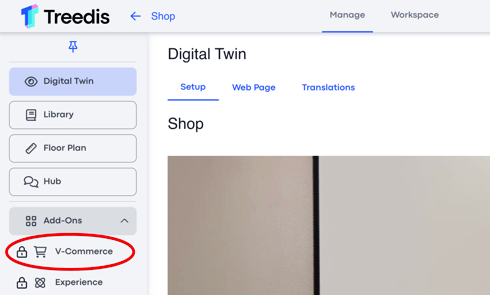
1\. **Login to your Treedis account and choose the needed tour.** Once logged in, you'll notice a dropdown menu on the left with a list of add-ons, navigate the V-Commerce:
****
2\. **After selecting the V-Commerce add-on, you will have the option to activate at the top right corner of the screen:**
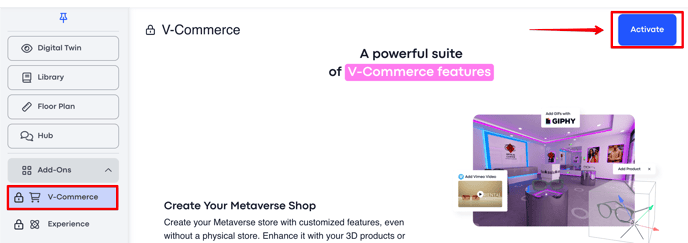
***Note:*** If you are a Business plan user, you have 4 credits to activate any Treedis add-on for free, including the V-Commerce.
3\. **Check for the blue cart icon.** Once you see the cart icon turn blue, you'll know that your tour has active V-Commerce add-on.

---
If you have any questions or need further assistance, please contact us at
[support@treedis.com](mailto:support@treedis.com)
- [Workspace NEW](https://info.treedis.com/help.center/workspace-new)
- [3D Editor](https://info.treedis.com/help.center/3d-editor#main-content)
- [Interface](https://info.treedis.com/help.center/3d-editor#interface)
- [Intro Screen](https://info.treedis.com/help.center/3d-editor#intro-screen)
- [3D Scans](https://info.treedis.com/help.center/3d-editor#3d-scans)
- [Burger Menu](https://info.treedis.com/help.center/3d-editor#burger-menu)
- [Highlight Reel](https://info.treedis.com/help.center/3d-editor#highlight-reel)
- [Map](https://info.treedis.com/help.center/3d-editor#map)
- [Panorama](https://info.treedis.com/help.center/3d-editor#panorama)
- [Tags](https://info.treedis.com/help.center/3d-editor#tags)
- [Polygons](https://info.treedis.com/help.center/3d-editor#polygons)
- [Measurements Feature](https://info.treedis.com/help.center/3d-editor#measurements-feature)
- [Media / Vimeo / Green Screen](https://info.treedis.com/help.center/3d-editor#media-vimeo-green-screen)
- [Giphy / Sketchfab](https://info.treedis.com/help.center/3d-editor#giphy-sketchfab)
- [Virtual Staging / Avatars](https://info.treedis.com/help.center/3d-editor#virtual-staging-avatars)
- [FAQ](https://info.treedis.com/help.center/faq)
- [Manage](https://info.treedis.com/help.center/manage)
- [IoT Integrations](https://info.treedis.com/help.center/iot-integrations)
- [Analytics](https://info.treedis.com/help.center/analytics)
- [Treedis AI](https://info.treedis.com/help.center/treedis-ai)
- [Work Requests (Notes)](https://info.treedis.com/help.center/work-requests-notes)
- [White Label](https://info.treedis.com/help.center/white-label)
- [Flows](https://info.treedis.com/help.center/flows)
- [Navigation](https://info.treedis.com/help.center/navigation)
- [Experience Creator \*](https://info.treedis.com/help.center/experience-creator)
- [VR (Virtual Reality)](https://info.treedis.com/help.center/vr-virtual-reality)
- [AR (Augmented Reality)](https://info.treedis.com/help.center/ar-augmented-reality)
- [HUB \*](https://info.treedis.com/help.center/hub)
- [Billing & Subscription](https://info.treedis.com/help.center/billing-subscription)
- [V-Commerce](https://info.treedis.com/help.center/v-commerce)
[%20(1).png?width=16&height=24&name=Group%2039638%20(1)%20(1).png "Chill listening crop-3")](https://www.treedis.com)
treedis.com Help Center
Copyright © 2025, treedis.com