---
title: "Measurements: Imperial and Metric Units"
description: Measurements tool
---
[Skip to content](https://info.treedis.com/help.center/measurements-imperial-and-metric-units#main-content)
English
Show submenu for translations
Open main navigation
Close main navigation
- English
Show submenu for translations
- [Go to treedis.com](https://www.treedis.com/)
[Go to treedis.com](https://www.treedis.com/)
This is a search field with an auto-suggest feature attached.
- There are no suggestions because the search field is empty.
1. [Help Center](https://info.treedis.com/help.center)
2. [3D Editor](https://info.treedis.com/help.center/3d-editor)
3. [Measurements Feature](https://info.treedis.com/help.center/3d-editor#measurements-feature)
# Measurements: Imperial and Metric Units
The Measurements feature is now available within the Treedis workspace.
This feature supports the display of measurements created both in Matterport and directly inside Treedis tours. In addition, Treedis users now have full control over measurement units and can switch between Imperial and Metric systems within public tours, independently of the unit settings configured in Matterport.

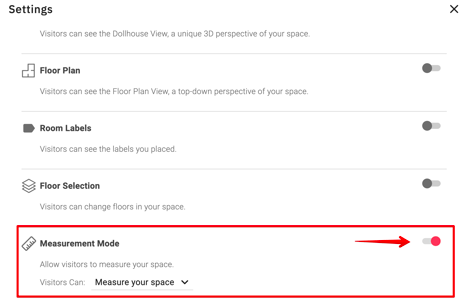
Since the Measurements feature is SDK-based, it must first be **enabled in the Matterport settings** in order to work on the Treedis side.
### Creating Measurements
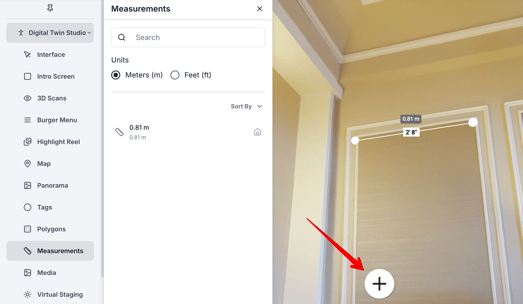
Once the feature is enabled for the tour, you can start creating measurements by clicking the **“+” icon**, following the familiar Matterport interface. All created measurements will then appear in the admin panel.
Measurements can be created in the following 3 modes: **Workspace, Dollhouse** and **Floor Plan** view. An indicator icon will show in which mode each measurement was created. 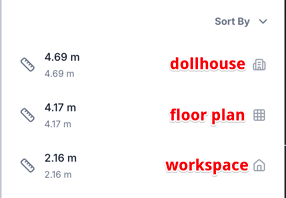
**Note:** Measurements are mode-specific and can only be displayed in the same mode in which they were created.
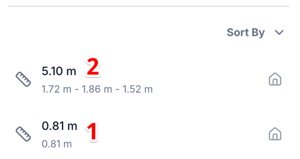
The Measurements feature supports the display of:
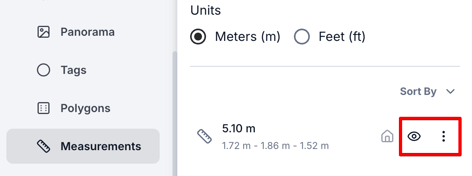
1\. Total measurement length: e.g. 0.81 m
2\. And segment breakdown: e.g. 1.72 m – 1.86 m – 1.52 m
**Important:** To access the settings for created measurement items on the admin panel, you will need to **refresh the page**. This step is currently required due to a Matterport limitation.
After refreshing the page, the following options will become available in the admin panel:
- Visibility toggle – to show or hide measurements
- Three-dot menu – to rename or delete measurements
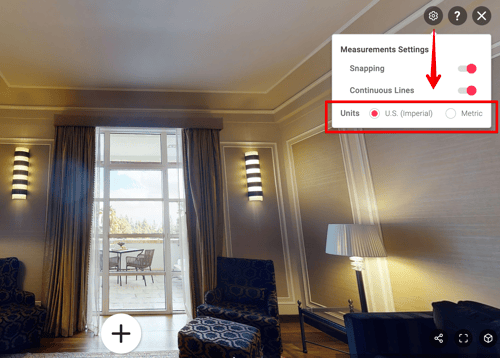
Additionally, within the Treedis public tour, users can now conveniently switch between **Imperial units (feet/inches)** and **Metric units (meters/centimeters),** thatprovides greater flexibility when working with measurements tool.
---
If you have further questions or need assistance with the settings, please contact us at [support@treedis.com](mailto:support@treedis.com)
- [Workspace NEW](https://info.treedis.com/help.center/workspace-new)
- [3D Editor](https://info.treedis.com/help.center/3d-editor#main-content)
- [Interface](https://info.treedis.com/help.center/3d-editor#interface)
- [Intro Screen](https://info.treedis.com/help.center/3d-editor#intro-screen)
- [3D Scans](https://info.treedis.com/help.center/3d-editor#3d-scans)
- [Burger Menu](https://info.treedis.com/help.center/3d-editor#burger-menu)
- [Highlight Reel](https://info.treedis.com/help.center/3d-editor#highlight-reel)
- [Map](https://info.treedis.com/help.center/3d-editor#map)
- [Panorama](https://info.treedis.com/help.center/3d-editor#panorama)
- [Tags](https://info.treedis.com/help.center/3d-editor#tags)
- [Polygons](https://info.treedis.com/help.center/3d-editor#polygons)
- [Measurements Feature](https://info.treedis.com/help.center/3d-editor#measurements-feature)
- [Media / Vimeo / Green Screen](https://info.treedis.com/help.center/3d-editor#media-vimeo-green-screen)
- [Giphy / Sketchfab](https://info.treedis.com/help.center/3d-editor#giphy-sketchfab)
- [Virtual Staging / Avatars](https://info.treedis.com/help.center/3d-editor#virtual-staging-avatars)
- [FAQ](https://info.treedis.com/help.center/faq)
- [Manage](https://info.treedis.com/help.center/manage)
- [IoT Integrations](https://info.treedis.com/help.center/iot-integrations)
- [Analytics](https://info.treedis.com/help.center/analytics)
- [Treedis AI](https://info.treedis.com/help.center/treedis-ai)
- [Work Requests (Notes)](https://info.treedis.com/help.center/work-requests-notes)
- [White Label](https://info.treedis.com/help.center/white-label)
- [Flows](https://info.treedis.com/help.center/flows)
- [Navigation](https://info.treedis.com/help.center/navigation)
- [Experience Creator \*](https://info.treedis.com/help.center/experience-creator)
- [VR (Virtual Reality)](https://info.treedis.com/help.center/vr-virtual-reality)
- [AR (Augmented Reality)](https://info.treedis.com/help.center/ar-augmented-reality)
- [HUB \*](https://info.treedis.com/help.center/hub)
- [Billing & Subscription](https://info.treedis.com/help.center/billing-subscription)
- [V-Commerce](https://info.treedis.com/help.center/v-commerce)
[%20(1).png?width=16&height=24&name=Group%2039638%20(1)%20(1).png "Chill listening crop-3")](https://www.treedis.com)
treedis.com Help Center
Copyright © 2025, treedis.com