---
title: "TAI Design: Feature Settings and Credits System"
description: "TAI Design: Feature Settings and Credits System"
---
[Skip to content](https://info.treedis.com/help.center/tai-design-feature-settings-and-credits-system#main-content)
English
Show submenu for translations
Open main navigation
Close main navigation
- English
Show submenu for translations
- [Go to treedis.com](https://www.treedis.com/)
[Go to treedis.com](https://www.treedis.com/)
This is a search field with an auto-suggest feature attached.
- There are no suggestions because the search field is empty.
1. [Help Center](https://info.treedis.com/help.center)
2. [Treedis AI](https://info.treedis.com/help.center/treedis-ai)
# TAI Design: Feature Settings and Credits System
Meet the new **Treedis AI (TAI) Design**. You can now work in both 2D and 360° editor modes, save designs directly inside your space, and share them with clients. Plus, a new credit system that allows you to manage your AI prompts and usage.
The TAI feature is available across all Treedis subscription plans.
**[Click here](https://info.treedis.com/help.center/tai-design-in-tour-editing)** to explore the possibilities of **TAI Design in-tour editing**.
### **How to Access TAI Design**
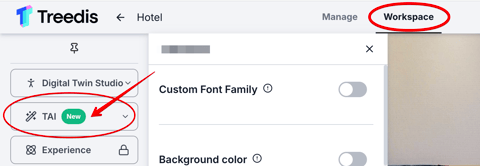
To access TAI Design: open your tour \> navigate to the **Workspace** section \> select **TAI** from the left sidebar, located below Digital Twin Studio:
To activate the feature, open the TAI panel and switch on the **TAI Design** toggle. You can choose where the feature should be enabled: 1) Public and Workspace mode, 2) or Workspace only.
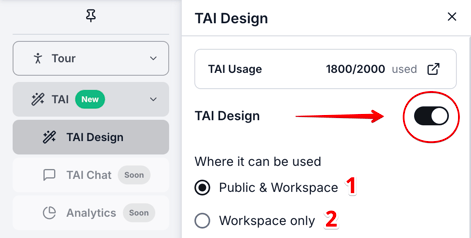
Both public and workspace modes consume TAI credits in the same way.
### **TAI Usage: Credits System**
**TAI** **Credits** are the currency used within the Treedis ecosystem to execute AI-powered design actions, such as virtually staging an empty space or restyling an existing room. Every time you generate a new design or edit a space using our AI tool, it consumes a certain number of credits.
At the top of the TAI Design panel, you can review information related to **TAI Usage.** This section displays your credit balance, specifically how many total credits you have on your current plan and how many were used, so that you know the **remaining balance.**
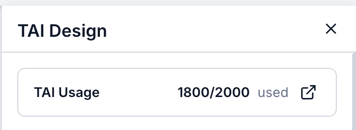
Each Treedis subscription plan includes a default monthly allocation of TAI credits:
- **Basic (free) plan:** 100 TAI credits per month
- **Growth plan:** 1,000 TAI credits per month
- **Business plan:** 2,000 TAI credits per month
- **Enterprise plan:** 6,000 TAI credits per month
**IMPORTANT:**
- Included credits **reset** every month at the start of your billing cycle.
- Unused credits will **expire**. If you did not use all credits, they will not carry over to next month.
- Treedis **yearly plans** allow **Credit Rollover** for the entire year. This means your full annual credit allowance is available immediately. Unused credits roll over from month to month until the end of your billing year.
### **TAI Credits Packs**
If you reach your credit limit, you can purchase more by clicking the icon and selecting **"Get more credits”:**
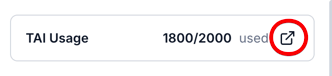
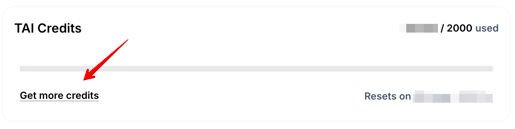
Your purchasing options for TAI Credits depend on your Treedis subscription plan:
- If your Treedis plan is paid **monthly** - additional TAI credits are purchased on a monthly basis.
- If your Treedis plan is paid **yearly** - additional TAI credits are purchased annually.
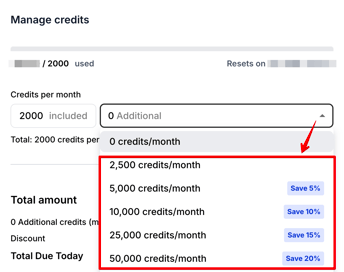
The following credit packages are available for purchase:
**Business and Growth Top-Ups** - these packages are available for Growth and Business users and range from 2,500 to 50,000 credits.
| Credits | Monthly Price | Annual Price |
| --- | --- | --- |
| 2,500 | $25 | $240 |
| 5,000 | $47.50 | $460 |
| 10,000 | $90 | $870 |
| 25,000 | $212.50 | $2,040 |
| 50,000 | $400 | $3,850 |
****
**Enterprise Top-Ups** - these volume packs are tailored for high-volume usage and offer effective credit packs ranging from 100,000 to 1,000,000 credits.
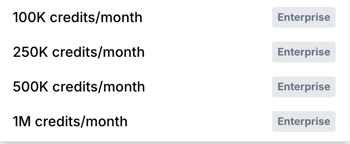
- Enterprise credit packs are purchased on an **annual basis only,** monthly payments are not applied.
- Annual Top-Ups offer **significant savings** compared to paying month-to-month.
- Annual packs allow **Credit Rollover**, ensuring you don't lose the credits you paid for.
- These packs are **exclusive to Enterprise** **users** and are managed directly by the Sales Team. To add a credit pack on the Enterprise plan, please use the[**contact Sales form**](https://www.treedis.com/contact-sales)**or send a message directly to your account manager.**
### **2D / 360° Mode: Pricing**
The amount of TAI credits included in your plan does not equal the number of AI prompts a user can generate. Each time you create a new design or edit a space using TAI Design, a certain number of credits is consumed. The cost per prompt depends on the selected image generator quality: **2D** or **360° (Panorama).**
In the **Pricing** section of the TAI Design panel, you can choose between two available modes:
- **2K** **2D** (20 credits per prompt)
- **4K** **360°** (60 credits per prompt)
By enabling the toggles, you can decide whether both modes (2D and 360°) or only one of them will be available for editing on your public tour link.
 
The toggle **“Set as default”** defines which mode the TAI Design panel will launch in for tour visitors by default.

**2D** image generation is faster and more affordable but offers standard quality.
**360°** imagegeneration provides higher-quality, more detailed results, but requires additional processing time.
### **Tour-Level Credit Allocation**
While your account holds the total pool of TAI Credits, you have full control to allot a specific number of credits to **individual tours**. This allows you to set a "budget" for the specific project, ensuring that no single tour accidentally consumes your entire credit balance.
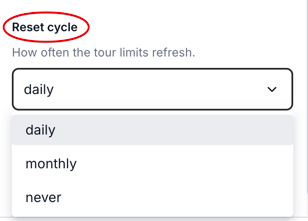
To assign a specific number of credits to a tour, enable the **Limits** toggle. By default, each tour is assigned a limit of **80 credits**, which you can adjust according to your project requirements.
 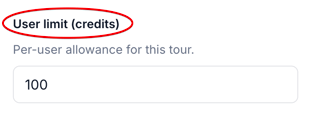
You can also define the **reset cycle** for the tour’s credit limit, choosing whether it should refresh *daily, monthly, or never,* depending on how you want to manage the usage.
**[Click here](https://info.treedis.com/help.center/tai-design-in-tour-editing)** to explore the possibilities of **TAI Design in-tour editing**.
---
If you have further questions or need assistance with the settings, please contact us at [support@treedis.com](mailto:support@treedis.com)
- [Workspace NEW](https://info.treedis.com/help.center/workspace-new)
- [3D Editor](https://info.treedis.com/help.center/3d-editor#main-content)
- [Interface](https://info.treedis.com/help.center/3d-editor#interface)
- [Intro Screen](https://info.treedis.com/help.center/3d-editor#intro-screen)
- [3D Scans](https://info.treedis.com/help.center/3d-editor#3d-scans)
- [Burger Menu](https://info.treedis.com/help.center/3d-editor#burger-menu)
- [Highlight Reel](https://info.treedis.com/help.center/3d-editor#highlight-reel)
- [Map](https://info.treedis.com/help.center/3d-editor#map)
- [Panorama](https://info.treedis.com/help.center/3d-editor#panorama)
- [Tags](https://info.treedis.com/help.center/3d-editor#tags)
- [Polygons](https://info.treedis.com/help.center/3d-editor#polygons)
- [Measurements Feature](https://info.treedis.com/help.center/3d-editor#measurements-feature)
- [Media / Vimeo / Green Screen](https://info.treedis.com/help.center/3d-editor#media-vimeo-green-screen)
- [Giphy / Sketchfab](https://info.treedis.com/help.center/3d-editor#giphy-sketchfab)
- [Virtual Staging / Avatars](https://info.treedis.com/help.center/3d-editor#virtual-staging-avatars)
- [FAQ](https://info.treedis.com/help.center/faq)
- [Manage](https://info.treedis.com/help.center/manage)
- [IoT Integrations](https://info.treedis.com/help.center/iot-integrations)
- [Analytics](https://info.treedis.com/help.center/analytics)
- [Treedis AI](https://info.treedis.com/help.center/treedis-ai)
- [Work Requests (Notes)](https://info.treedis.com/help.center/work-requests-notes)
- [White Label](https://info.treedis.com/help.center/white-label)
- [Flows](https://info.treedis.com/help.center/flows)
- [Navigation](https://info.treedis.com/help.center/navigation)
- [Experience Creator \*](https://info.treedis.com/help.center/experience-creator)
- [VR (Virtual Reality)](https://info.treedis.com/help.center/vr-virtual-reality)
- [AR (Augmented Reality)](https://info.treedis.com/help.center/ar-augmented-reality)
- [HUB \*](https://info.treedis.com/help.center/hub)
- [Billing & Subscription](https://info.treedis.com/help.center/billing-subscription)
- [V-Commerce](https://info.treedis.com/help.center/v-commerce)
[%20(1).png?width=16&height=24&name=Group%2039638%20(1)%20(1).png "Chill listening crop-3")](https://www.treedis.com)
treedis.com Help Center
Copyright © 2025, treedis.com