---
title: "White Label: DNS Records"
description: "The registration process for a White Label (WL) account typically takes up to 24 hours. Below is an outline of the steps involved to help you understand the timeline: Our servers will connect to your"
---
[Skip to content](https://info.treedis.com/help.center/white-label-dns-records#main-content)
English
Show submenu for translations
Open main navigation
Close main navigation
- English
Show submenu for translations
- [Go to treedis.com](https://www.treedis.com/)
[Go to treedis.com](https://www.treedis.com/)
This is a search field with an auto-suggest feature attached.
- There are no suggestions because the search field is empty.
1. [Help Center](https://info.treedis.com/help.center)
2. [White Label](https://info.treedis.com/help.center/white-label)
# White Label: DNS Records
The **registration process** for a White Label (WL) account typically takes **up to 24 hours.** Below is an outline of the steps involved to help you understand the timeline:
- Once the White Label solution is purchased/activated, you provide us with your desired subdomain+domain and WL email address.
- We register your domain in our system and generate the DNS records for you.
- You then add these DNS records to your domain registry on your end.
Our servers will connect to your DNS records **at midnight**, so the tours will start loading under your domain the next day.
#### **DNS Records**
Once we complete the registration on our end, you will receive **2 emails**:
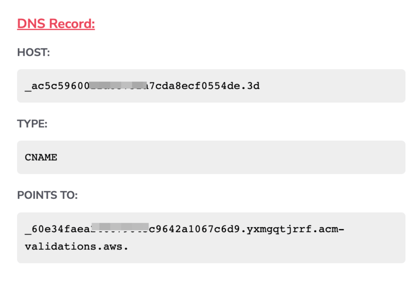
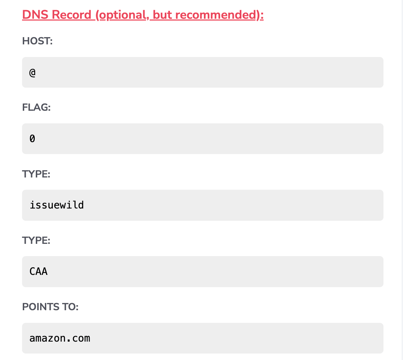
1. **The email containing the DNS records** (two CNAME records and one optional CAA record). The DNS records are valid for 72 hours.
2. **The email sent to your White Label email address** **from Postmark**, which includes a confirmation link. Make sure to click the link to confirm your email - this step is necessary to enable lead collection from your tours.
Open an email with DNS records and add both CNAME records to your domain registry **exactly as they are given**. You will see the **Host**, **Type** and **Points to**. Just add them to your domain registry without any modification.
*Example of one of the records:*
The third **CAA record is optional**, as it depends on your hosting provider. Some hosting services require this record to establish a connection with our servers, while others do not. We recommend adding this optional record if possible. However, if your hosting provider does not offer the option to add a CAA record, please contact us at [support@treedis.com](mailto:support@treedis.com) so we can verify and assist with this matter.
**
***Important:*** Treedis does not perform configurations on the user's side and is not responsible for settings on external websites. As such, we are unable to provide recommendations regarding third-party hosting services.
If you are familiar with your hosting platform, you may proceed to add the required DNS records directly to your domain registry. However, if you are uncertain about any step in the process, we strongly recommend consulting an expert or reaching out to your hosting provider’s technical support team for guidance.
- [Workspace NEW](https://info.treedis.com/help.center/workspace-new)
- [3D Editor](https://info.treedis.com/help.center/3d-editor#main-content)
- [Interface](https://info.treedis.com/help.center/3d-editor#interface)
- [Intro Screen](https://info.treedis.com/help.center/3d-editor#intro-screen)
- [3D Scans](https://info.treedis.com/help.center/3d-editor#3d-scans)
- [Burger Menu](https://info.treedis.com/help.center/3d-editor#burger-menu)
- [Highlight Reel](https://info.treedis.com/help.center/3d-editor#highlight-reel)
- [Map](https://info.treedis.com/help.center/3d-editor#map)
- [Panorama](https://info.treedis.com/help.center/3d-editor#panorama)
- [Tags](https://info.treedis.com/help.center/3d-editor#tags)
- [Polygons](https://info.treedis.com/help.center/3d-editor#polygons)
- [Measurements Feature](https://info.treedis.com/help.center/3d-editor#measurements-feature)
- [Media / Vimeo / Green Screen](https://info.treedis.com/help.center/3d-editor#media-vimeo-green-screen)
- [Giphy / Sketchfab](https://info.treedis.com/help.center/3d-editor#giphy-sketchfab)
- [Virtual Staging / Avatars](https://info.treedis.com/help.center/3d-editor#virtual-staging-avatars)
- [FAQ](https://info.treedis.com/help.center/faq)
- [Manage](https://info.treedis.com/help.center/manage)
- [IoT Integrations](https://info.treedis.com/help.center/iot-integrations)
- [Analytics](https://info.treedis.com/help.center/analytics)
- [Treedis AI](https://info.treedis.com/help.center/treedis-ai)
- [Work Requests (Notes)](https://info.treedis.com/help.center/work-requests-notes)
- [White Label](https://info.treedis.com/help.center/white-label)
- [Flows](https://info.treedis.com/help.center/flows)
- [Navigation](https://info.treedis.com/help.center/navigation)
- [Experience Creator \*](https://info.treedis.com/help.center/experience-creator)
- [VR (Virtual Reality)](https://info.treedis.com/help.center/vr-virtual-reality)
- [AR (Augmented Reality)](https://info.treedis.com/help.center/ar-augmented-reality)
- [HUB \*](https://info.treedis.com/help.center/hub)
- [Billing & Subscription](https://info.treedis.com/help.center/billing-subscription)
- [V-Commerce](https://info.treedis.com/help.center/v-commerce)
[%20(1).png?width=16&height=24&name=Group%2039638%20(1)%20(1).png "Chill listening crop-3")](https://www.treedis.com)
treedis.com Help Center
Copyright © 2025, treedis.com