---
title: "Experience Creator: Locks - General Info"
description: Locks are fundamental to any experience where you would want to set conditions, such as hiding or revealing certain elements. Locks need to be assigned to different elements in the experience, like t
---
[Skip to content](https://info.treedis.com/help.center/experience-creator-locks-general-info#main-content)
English
Show submenu for translations
Open main navigation
Close main navigation
- English
Show submenu for translations
- [Go to treedis.com](https://www.treedis.com/)
[Go to treedis.com](https://www.treedis.com/)
This is a search field with an auto-suggest feature attached.
- There are no suggestions because the search field is empty.
1. [Help Center](https://info.treedis.com/help.center)
2. [Experience Creator \*](https://info.treedis.com/help.center/experience-creator)
# Experience Creator: Locks - General Info
Locks are fundamental to any experience where you would want to set conditions, such as hiding or revealing certain elements.
Locks need to be assigned to different elements in the experience, like tags/polygons/videos etc. As such, ensure that you first upload all of your media before you begin creating locks.
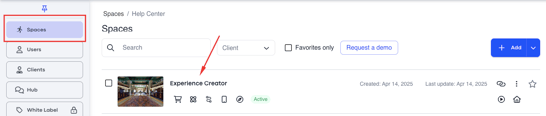
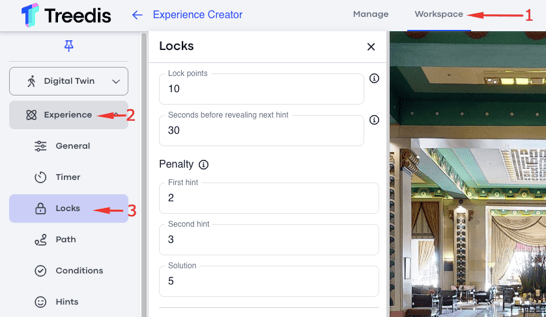
To find Locks, follow this path:
1\. Spaces \> Select the tour:
2\. Workspace \> Experience add-on: Locks
#### **Functionality**
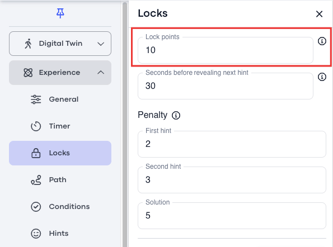
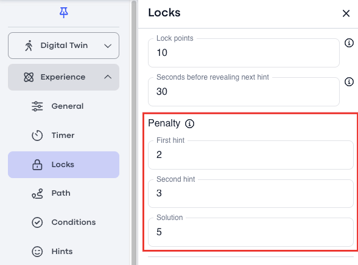
**Lock Points**
This is where you define how many points you want the user to be awarded for each lock. This will set a general number for each lock, but if you want certain locks to have different points then you can also define this individually per lock later when adding them.
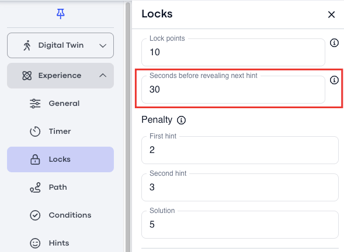
**Seconds Before Revealing Next Hint**
This is where you set how long you would like the user to wait in between hints. This can also be defined per lock.
**Penalty**
This is where you define the points that need to be deducted for each hint. This can also be defined per lock.
### **Adding Locks**
To add a new Lock, click "+ Add".
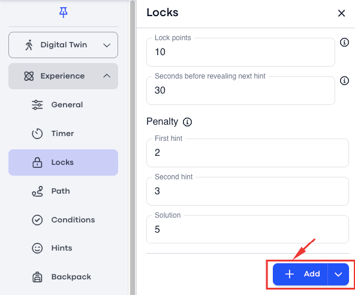
There are **6** **different types** of locks that can be added to the experience.
1\) Code Lock
2\) Keyboard Lock
3\) Pop Up Trivia Lock
4\) Sequence Lock
5\) Collect Lock
6\) Genial.ly lock
- [Workspace NEW](https://info.treedis.com/help.center/workspace-new)
- [3D Editor](https://info.treedis.com/help.center/3d-editor#main-content)
- [Interface](https://info.treedis.com/help.center/3d-editor#interface)
- [Intro Screen](https://info.treedis.com/help.center/3d-editor#intro-screen)
- [3D Scans](https://info.treedis.com/help.center/3d-editor#3d-scans)
- [Burger Menu](https://info.treedis.com/help.center/3d-editor#burger-menu)
- [Highlight Reel](https://info.treedis.com/help.center/3d-editor#highlight-reel)
- [Map](https://info.treedis.com/help.center/3d-editor#map)
- [Panorama](https://info.treedis.com/help.center/3d-editor#panorama)
- [Tags](https://info.treedis.com/help.center/3d-editor#tags)
- [Polygons](https://info.treedis.com/help.center/3d-editor#polygons)
- [Measurements Feature](https://info.treedis.com/help.center/3d-editor#measurements-feature)
- [Media / Vimeo / Green Screen](https://info.treedis.com/help.center/3d-editor#media-vimeo-green-screen)
- [Giphy / Sketchfab](https://info.treedis.com/help.center/3d-editor#giphy-sketchfab)
- [Virtual Staging / Avatars](https://info.treedis.com/help.center/3d-editor#virtual-staging-avatars)
- [FAQ](https://info.treedis.com/help.center/faq)
- [Manage](https://info.treedis.com/help.center/manage)
- [IoT Integrations](https://info.treedis.com/help.center/iot-integrations)
- [Analytics](https://info.treedis.com/help.center/analytics)
- [Treedis AI](https://info.treedis.com/help.center/treedis-ai)
- [Work Requests (Notes)](https://info.treedis.com/help.center/work-requests-notes)
- [White Label](https://info.treedis.com/help.center/white-label)
- [Flows](https://info.treedis.com/help.center/flows)
- [Navigation](https://info.treedis.com/help.center/navigation)
- [Experience Creator \*](https://info.treedis.com/help.center/experience-creator)
- [VR (Virtual Reality)](https://info.treedis.com/help.center/vr-virtual-reality)
- [AR (Augmented Reality)](https://info.treedis.com/help.center/ar-augmented-reality)
- [HUB \*](https://info.treedis.com/help.center/hub)
- [Billing & Subscription](https://info.treedis.com/help.center/billing-subscription)
- [V-Commerce](https://info.treedis.com/help.center/v-commerce)
[%20(1).png?width=16&height=24&name=Group%2039638%20(1)%20(1).png "Chill listening crop-3")](https://www.treedis.com)
treedis.com Help Center
Copyright © 2025, treedis.com