Treedis offers powerful add-ons designed to elevate experience of your 3D tours, making them more engaging and interactive. These add-ons unlock new possibilities across various industries, including e-commerce, marketing, training, and navigation.
- Flows: Revolutionizes workflow digitization, making training, onboarding, and maintenance more streamlined and interactive.
- Augmented Reality (AR): Enhances the physical world with augmented layers and can be accessed on mobile and tablet devices through the Treedis AR app.
- Navigation Tool: Provides an advanced editor mode for better navigation control, making virtual tours more user-friendly and efficient.
- V-Commerce: Transform your virtual tour into a fully functional online store, offering a seamless shopping experience that stands out.
Add-Ons Activation and Usage
Add-ons cannot be purchased individually. They are available across all paid subscription tiers and are activated through the credit system. Note: the Basic (free) plan does not include the add-on credits.
- Business plan workspace - 4 credits included in its subscription, allowing you to activate add-ons at no additional cost. These credits can be used for a single space or distributed across up to four different spaces (e.g., 4 Flows tours or a combination such as 2 Navigation tours + 2 AR tours, etc).
- Premium plan workspace - 30 credits included in its subscription.
- Enterprise plan workspace - custom number of credits.
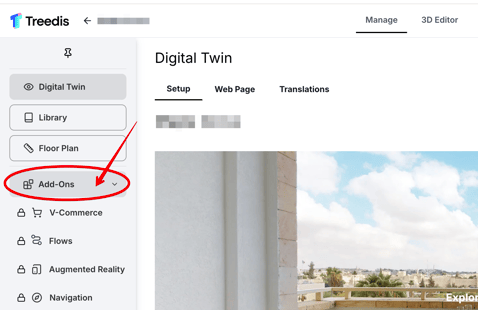
To activate an add-on, open the tour's Manage section and click the Add-ons icon in the left sidebar. From there, select the add-on you would like to enable.
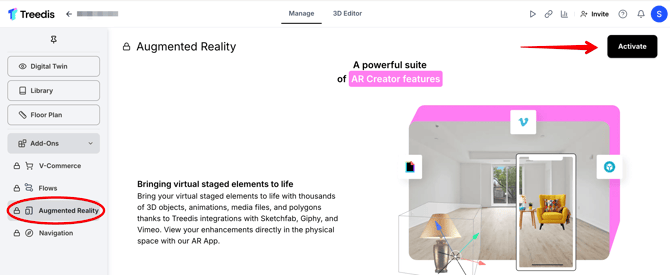
Then click the Activate button.
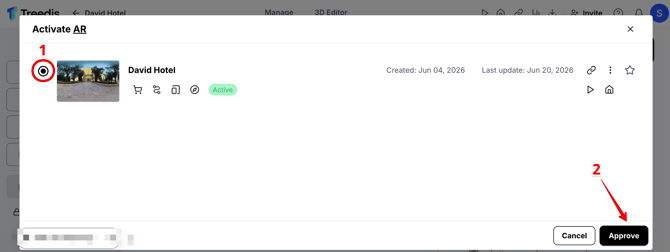
Choose the tour where you would like to have an add-on and click Approve.
Once activated, you can review which add-ons are currently enabled for this and other tours by opening the Add-ons tab in the left sidebar. If needed, you can deactivate an add-on at any time by clicking the three-dot menu. 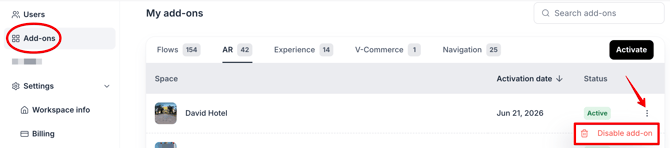
Important: Removing an add-on will also erase all settings associated with it.
You can then start crafting your exclusive tour in the 3D Editor. For detailed guidance on setting up each add-on, visit our Help Center, where you will find the instructions for each feature: AR, Navigation, Flows, V-Commerce.
Note: Additional add-ons cannot be purchased separately. If you require more than the number of add-ons included with your subscription, you will need to upgrade your workspace plan. Alternatively, you can deactivate an add-on that is currently assigned to a tour to return the credit and use it on a different tour.
If you have further questions or need assistance with the settings, please contact us at support@treedis.com